
Posted in Informational, Simple Malware Analysis

Bazar Call Emails: More than a Scam

This week I learned about Bazar Call /Bazarloader Malware. I had never heard of this malware campaign. Even when it was explained to me I didn’t think that it would have a high success rate, but doing more research it is really successful.

The whole cycle starts with an email one that often talks about the end of a free subscription or being charged for a renewal or the like. This email might not have any links or attachments, but will have a number for the recipient to call.

<sidebar: I’d always thought these types of emails had 1 purpose and that was to scam recipients by getting them to call and then getting them to divulge credit card information or other personal information…my viewpoint was limited .>

When the recipient calls to cancel or dispute the precieved charges they are directed by the ‘call center’ to a website and this website downloads bazarloader malware which can be a carrier for other malicious code like Trojans or Ransomware.

https://unit42.paloaltonetworks.com/bazarloader-malware/

So, I learned something new this week. I’m always amped when I learn something and I usually want to learn more about it. So, I’m doing more deep diving on Bazarloader and to see if there are other similar campaigns.

This whole thing also reinforced thinking outside the box when it comes to attacks. Often times, the simplest objective isn’t the true objective. Why hook a little phish when a marlin is out there like encrypting and ransoming an entire enterprise?

Also long story short, whether it’s a credit card scam or something more malicious, like this: don’t call random numbers in emails.
More readings on Bazar Call:

Posted in Informational, Topic

Phishing

Spam, Scams, and Being Targeted…

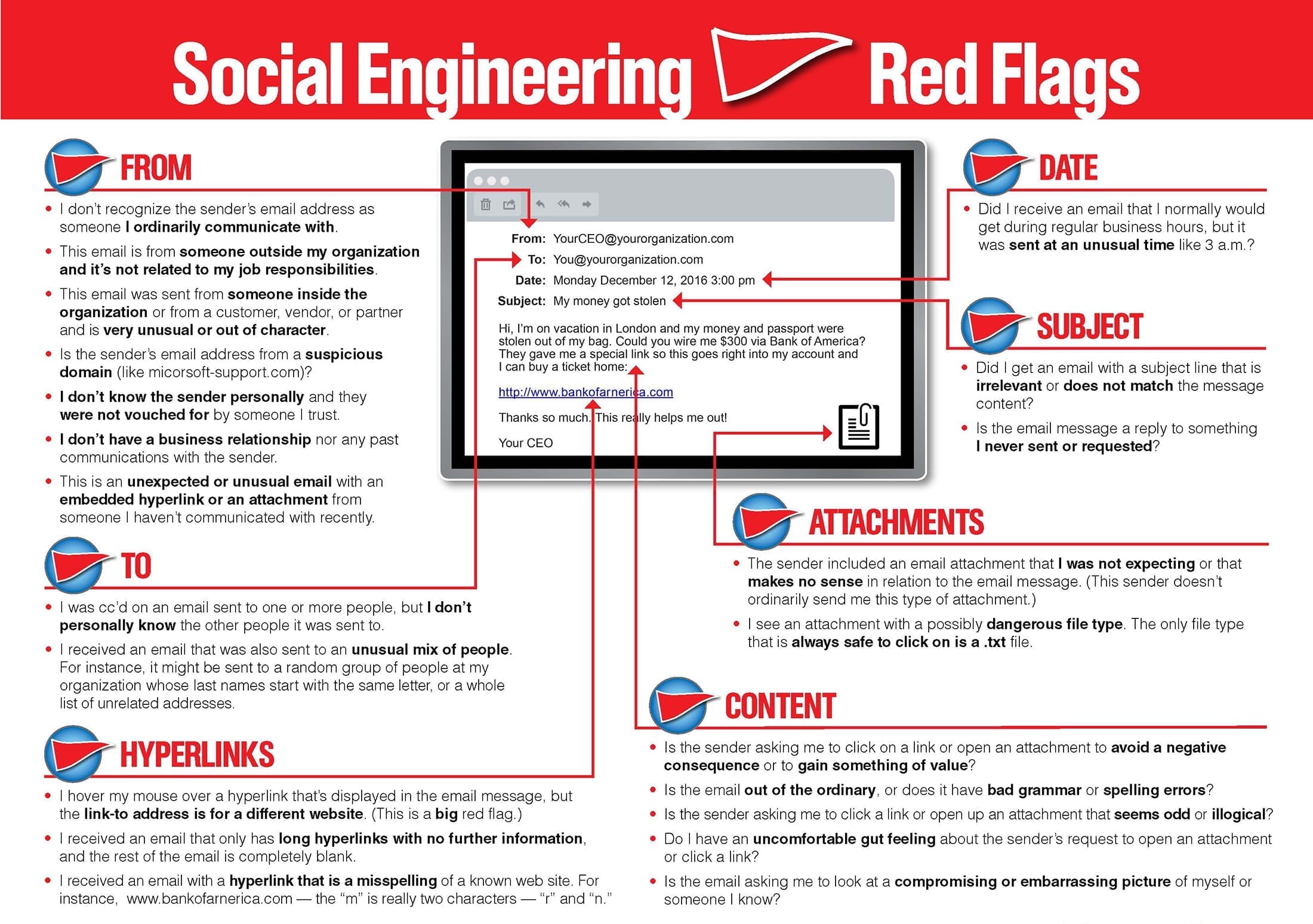
Regardless of whether you are the CEO of a Fortune 500 or a blue-collar worker with hundreds in the bank there is a price on your personal identifiable information (PII). The cost of your information can range from the amount of money you currently have in an account, the amount of credit extended on a card, or the usability of your credentials in escalated attacks. That’s not fear-mongering, it’s a fact. Information is a commodity and either yours and/or the information you hold is worth something. Thankfully, phishing emails can be easily combated with just an increase in situational awareness and following simple rules for emails.

  • This means looking at the sender of emails; including matching the sender name and the sender’s email address.
  • Being wary of all links and attachments. If the attachment is from a stranger or not expected from the sender err on the side of caution and don’t download it without verifying the sender (not through email).
  • Assume links are suspicious. This is just the easiest way to avoid misdirection. If you need to check something out for an account don’t use the email links instead go directly to the site via the browser by typing it in.
References
More Examples of PHishing Emails
Glossary
  1. Phishing – crafted, usually mass-sent emails used to try and garner information from the targets. These are usually not a well crafted, can be automated. Also a broad term that encompasses: spear-phishing and whaling.
  2. Spear-phishing- An email attack which is targeted to certain people, persons, or groups. These emails will be more well crafted and will try to use public available information to craft the message.
  3. Whaling-An even more targeted attack than spear-phishing which casts an even smaller “net” targeting CEOs, COOS, and other upper management accounts.
  4. Social Engineering- Broad term for attacking the “human” element of organizations. This type of attack uses human nature to try and get information or gain access. Phishing falls under social engineering as an attack type.
  5. Situational Awareness- Practicing calm in the moment in order to analyze environmentally what is occurring.
  6. Spoof[ing]- Imitation; pretending or portraying to be an entity in which they are not.