This is not going to be one of those post telling anyone to maximize productivity during the Pandemic. We don’t do that.
What this is is a running list of tech and cybersecurity geared learning opportunities that are currently having specials during the COVID-19 pandemic so that anyone that sees this and wants to pass it along or take advantage can.
The second type of lab I’m currently working on is a dual-boot machine. Some might not advise to building from this type of lab, but it can allow for having a computer that is on a segregated network for analysis and then having that computer also be set with a deep freeze program that resets the computer after logging off cleaning it or having a windows computer that can run Fireye Flare VM again in a double segregated environment.
The idea for this Lab came from interactions with similar set-ups without the dual-booting in which the lab was set-up for analysis on a segregated network. The dual-booting for me was kind of a bonus, because I had wanted to try doing it for a while and then also because it allows me a computer to run Linux away from my main computer while also running Windows. It gives me access to use tools that might be made for either platform in the same computer giving it a singular purpose.
Currently, this lab is not in it’s completed iteration. I still mainly use the VM lab to work on CTFs or do classwork, but this lab is coming 1.0 before the end of summer. So look forward to 2.a, etc in the near future.
PROS:
Keeps Lab separate from main computer
Allows for practicing from both a Linux and Windows Environment
Deep Freeze Software can be used to reset computer after analysis
I written about my troubles with time over and over, it’s a reoccurring theme. Time shouldn’t be one’s enemy, but sometimes it does feel like it is. I know that I have a strong procrastination streak and thus far it hasn’t hurt me,but I want to be better with my time, even if it was just to make myself feel a bit more organized.
I also believe that this is a personal concept. Time, can feel like a weight for some and for others making schedules and being on top of their time management can feel cathartic. For me, it’s a tad bit more anxiety-filling. Bullet notebooks and super strict schedules make me itch. I don’t think “habit-tracking” is for me.
Don’t get me wrong, I do work better when I know things are due and I’m responsible, but not when that makes these things micromanage my time and effort. I like knowing there is a date and then finishing whatever, whenever I’m ready by that date. I cannot do the daily scheduled work, it just makes things tedious and increases the pressure I already put on myself.
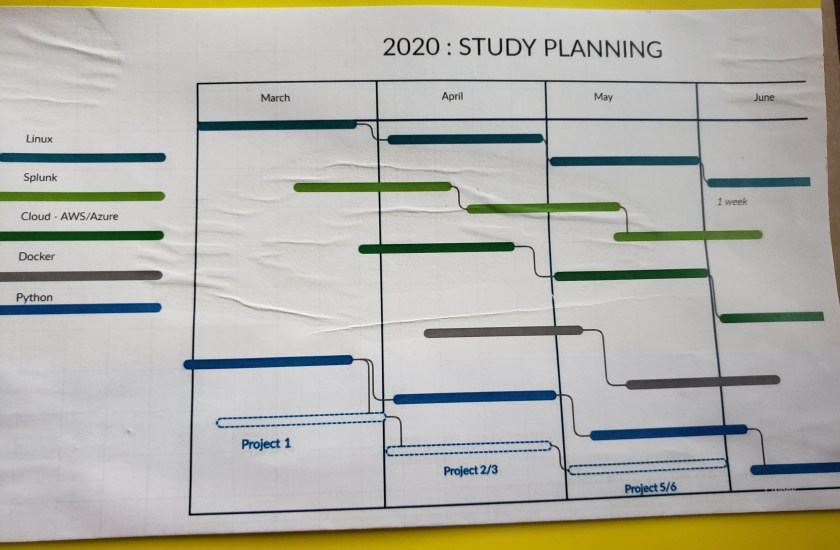
Which is why I came up with a nice little Gantt Chart for the 5 main things that I want to learn for the first halfish of this year. I only included things that I can find a certification for to judge my progress by. I only have the certification exam scheduled for Linux+ though; I bought that last year and have a hard deadline of September to take this exam, though I scheduled to take it Mid-July.
I do sometime wonder if the lack of a coherent tracking system is somehow holding me back from like “my full potential”. Other times I think that this works; the way I work works for me. It will not work for everyone or most, but it works for me. Besides, do I really need one more thing to try to learn and stress over?
By far the easiest method of getting a cyber lab up and running is using virtualbox or vmware. I’m partial to virtualbox because it’s free and my pockets love free. Using virtualbox one can build out a connected network that is separate from their actual machine (connection-wise). Using one or more of the vulnerable VMs on Vulnhub they can also test out and learn how to conduct a penetration test/hack a machine. They say the best way to learn is by doing. So, my first cyber lab has been through virtual machines. There are a number of good/great youtube tutorials on how to set-up VMs for a cyber lab so, I’m not going to rehash that. I will link to a couple that I found particularly helpful with this iteration of my lab:
The reasons I went in this direction for my first cyber lab is because it’s cost effective and easy to set-up, maintain, and ultimately breakdown. Making snapshots make making mistakes (it happens and crashing a lab and having to start all over is the worst) not as nerve-wrecking as it would be if you infected and crashed you actual machine. A virtual lab allows for a user to test networking, penetration testing, monitoring , and more without having to buy a lab. I would definitely recommend as a starting point if someone was trying to find a way to sharpen/grow their skills.
Recommended Virtual Machines
Kali Linux
Parrot OS
Metasploitable 2 (Great Beginner machine to hack)
A Windows Machine (7 or Better) [Available from Microsoft]
Minimum System Requirements:
Windows Vista or Higher (I’d recommend at least 7) or
Apple OS X (at least 10.9) or
The Most current update for the Linux Distro of your choice
RAM depends on the number of VMs running (16 GB is a good number)
Storage is based on the number of VMs running (30 MB for Virtualbox; At least 10GB per VM)

 Build A Security Ninja