

Spring Return
Since I failed the beta of CYSA+ CSO-002 by such a narrow margin (10pts), I’m going to take CSO-001 before it is retired.
My plan is to review my test report and then study the areas I faltered in. I make a packet of flashcards and focus my brief study to these areas.
I just feel like I’ll regret not attempting to complete the current test with how close I came to passing the beta.


The Cloud+ guide is very short in comparison to other study guides, but Linux+ has a section on cloud so this will feed off of that (hopefully).
Studying for this includes just 3 things:

The 4th edition study guide is super accessible and easy to understand
All-In-One is a more technical, dense book
Flashcards always and forever in deck, I like the spiral-bound to keep them altogether and easy “flippability”…
Also, not picture Cybrary Linux class and ITU CompTIA Linux class
Easy2Boot on a 64gb usb loaded with several different linux distros
Comptia just announced a cloud+ beta. Think I might take it just to feel out the material, it’s $50 and I’m interested in cloud security aspects in the future, so why not. Next few posts will be about the road to studying this, linux and cysa…because why not I’ve got time.

Sidenote: One of the subgenres I’m interested in beneath the umbrella of cybersecurity is Digital Forensics. Before I fully made the career switch I took a RITx class on the topic and was instantly interested. So, I always keep an eye out for books, videos, etc having to do with digital forensics.

As basic guides are rated this one is not so bad. I suppose I was expecting something similar to “The Basics of Hacking and Penetration Testing” that I reviewed earlier (here). The downfall to me if the book is that it feels as if it gives a cursory summation of most of the topics. Perhaps, this is colored by already being aware of many of the topics and thus I should have adjusted my expectations.
There are some sure shortfalls for example: 1. No real mention of linux and the differences between linux and windows investigations 2. Tools are mentioned,but not by name which means further investigation is stymied 3. The “flow” is stunted. There are chapters that seem misplaced ( notably the placement of the Legal chapter in the middle of the book) 4. The are sections that seem to wander away from the subject for example there is a good deal of talk about network protocols, but less on gathering evidence other than through logging.
I liked the inclusion of the case studies, but even those are brief. As a general overview of digital forensics it is mildly successful in that it does lead readers to other sources and mentions many popular tools used in the field. But what would have helped would have been a walk through that processed a case using these tools and the methodology of conducting a digital forensic investigation. The book was a lot of “tell” with little to no “show”.
All in all the book is informational to a point. Honestly, it is entirely more “basic” than expected and doesn’t give the depth that I was looking for even on an introductory/fundamentals level.
I attended Codeland in May 2018in New York City, New York. This was my first time at a tech conference and I think it was the first or second time they held the conference. It was also my first time in New York City.
Codeland was in a word awesome, because it was approachable. It is put on by Code Newbies and the majority of attendees are newer to coding/programming.
I enjoyed the conference because it didn’t feel like I needed to put on my “professional” face. I could just enjoy being there and listening to the talks and seeing all of the truly awesome ways that people were learning to code and using code in theory projects
If I could have changed 1 thing about the experience it would have been to get to know people there more, but I’m socially awkward on the best day. I also didn’t bring my laptop and that was a mistake.
This year they’re doing it distributed online and I really cannot wait to see how it goes.
Google: Codeland (Distributed) for more details….
Changing gears for a few posts.
There are many scholarly articles written regarding music and productivity. I know when I’m working noise helps me kind of focus and when I’m at work music helps to drown out other things. I actually spend a good deal of time listening to lessons or infographic shows, or historical bits because I’m kind of a nerd, but music aids my productivity. One of the best sounds I’ve found to listen to while working is Lofi Japanese HipHop or TripHop. I like sounds with heavy bass, but not having to think about words helps to just let the music be background.
In this occasional post series I’ll be sharing some of the music that aids in making me a more productive worker and/or helps me to study.
I really got into this type of sound while I was working overseas when I would listen to Arabic HipHop mixes. From there I branched out to this and as I stated above the lack of words makes me zoom into the sound and bop along as I type away.
So, before I set the tone that I just am not a “group work” type of person let me just say that this past Fall 2 semesters (2019) I had the best group experience. It does happen, if all member care equally as much about the grade and are just as interested in the topic.
We were tasked with choosing a Virtual Machine on VulnHub and using the Penetration Testing Methodology to work through finding and exploiting a vulnerability in order to gain access to the machine. We were doing this in conjunction with classwork wherein we worked through doing the same using Metasploitable 2 as the target machine.
So, let’s work quickly and briefly through this, because like some other beginners it helps to know that there is a method to the madness and following said method aids in keep any penetration test on track. If you don’t you’ll be like me during the NCL CTF bashing your head against problems as if that’s the way to solve them.
For this step the parameters of the assignment were given to us. Work through the methodology steps in order to gain access to the given machines.
This step was accomplished through various Nmap scans. This is easier for Metasploitable 2 than it is for HackFest 2019 because with Metasploitable one can login to the machine and then run ifconfig to get the machine’s IP address. With the HackFest Machine you cannot login because credentials are not given to you. There are 2 ways that I know to solve this problem: easy and cheat.
The easy way is to use your source machine (hopefully Kali or Parrot) and run an Nmap scan against the broadcast IP of the network [this only works if both machines are on the same network, this is certainly more difficult in the wild, but easy in a VM Lab Set-up on their own network]. You can get the broadcast IP by running ifconfig on the source machine and noting the broadcast IP in the first line.
| nmap XXX.XXX.XXX.0/# |
The Cheat is by bringing up the machine’s information in the Virtual Machine Application both VirtualBox and VMWare will tell you the IP address assigned to the machines.
Once you have the IP address for the target machine then use either Nmap or Zenmap to scan the target. It might take a couple of scans to get both UDP and TCP open ports and all the running services.
I’ll show the scan commands, but we used Zenmap which craft the commands based on the scan that is chosen and then the scans can be saved using a dropdown menu.
Useful Nmap Scans at this point (note that these can be combined into fewer scans):
nmap -sT IP_Address (TCP connect Scan)
nmap -sU IP_Address (UDP ports)
nmap -A -sV IP_Address (Standard OS and Service Detection)
nmap -p- IP_Address (Scan ALL Ports)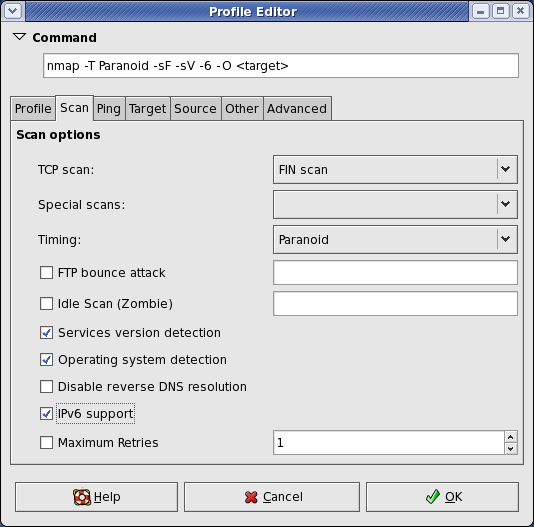
When we finished with the scan we’re left with a good bit of information, a whole list of ports that appear to be open. There’s also some information on the Services running on these ports and the Operating System running on our machine. Depending on what’s running and the command used we can also get some additional information regarding scripts or insecure passwords or encryption being used.
With this port information we have a narrower view of what or where or vulnerabilities might lay. These initial scans give us a little bit more direction. I think of it as being in a long hall lined on both walls with a bunch of doors. The Nmap scan would be making all the ones that cannot open disappear. The OpenVAS vulnerability scan in a way tells you which are the easiest to open.
I won’t go through setting up OpenVAS because there are better guides than mine that walk-through doing this.
We used the web interface to run our scans, sometimes it seems a bit clunky and can be slow, but for beginners it’s pretty simple to navigate. Set the IP of the target machine as the target and run the scan. Ours took anywhere from 30 mins -1 hour to run our scans.
After the scans are run we get a good bit of information including a CVSS Base Score (0-10.0: None/Low-Critical) for the Machine and a list of vulnerabilities on the machine. Each vulnerability is scored, some have remediation steps if there are any, and most tell the user how the vulnerability might be exploited.
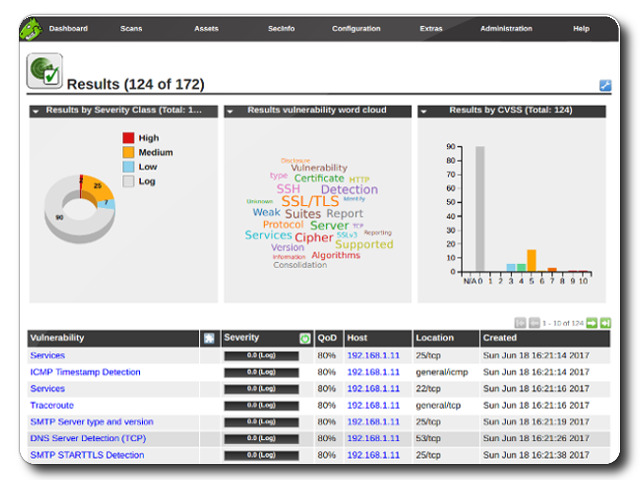
Now we know which doors can possibly unlocked, we just have to find the door that leads to where we need to go (usually privilege escalation) and not the ones that lead to the broom closet.
Although it is worth it to use the Metasploit Framework to work through exploitation on the Command Line again we’re new and in this class we used Armitage. I’ve done work in a previous class using Metasploit; Armitage is definitely easier. Armitage can take in your saved information from Nmap and OpenVAS and check for exploits and it can run automatic exploits to see if any work. Again, I’m not going to walk through setting up Armitage because this has been well traveled on the internet: here or here.
I will say that my partner also used WPScan because HackFest 2019 has a WordPress vulnerability. I didn’t so I’m not going to walk through that, but I’ll point you in the right direction for it.
Metasploitable 2 does not have a Word Press vulnerability. I won’t tell you where or which vulnerable connection, but there is a certain exploit that leads to a connection in which it is simple to escalate privilege to root and steal the shadow directory.
Promise, if I can do this, you can!
One of the main activities at this point is to conduct some password cracking. We have the shadow directory information which should contain some usernames and hashes. Copy these into a text file and with Johnny (the GUI for John the Ripper) feed them in.
Reporting might be a difficult part for some, but this really was the part to me where I shine. There are numerous examples of reports that can be found online. Also, how you write your report as far as content could depend on a number of factors including:
It’s important that the report be detailed, but approachable. It also needs to include recommendations for remediation as well as all proof that the vulnerabilities and the exploits exists. For class we had screenshots, but it it was a professional report this might not work as well in the middle of the paper, but rather in an appendix or exhibit at the end.
So, this will probably be a short post. I have just started the last class for the bachelor’s part of my dual degree (I know that some will say that going to school for cybersecurity is unnecessary, but I thrive in classroom settings or with direction). I’m antsy about finishing this part of the program. Honestly I’m a slight bit overwhelmed by the work as well. We’re suppose to finish a professional resume, a portfolio, a group project (group projects are the worst and online groups projects are like the 3rd level or hell), and an exam with a java programming portion. Sure, there are 15 weeks to complete all of that so it’s doable, but it’s still a bit nerve wrecking. I’m so afraid of failure it’s not funny. But, it’s better for me to admit that I’m scared than to act like I’m not scared. I just need to keep telling myself that I can do this and take it all week by week.
Wish Me Luck…
FINISH STRONG!
 Build A Security Ninja