Blog Feed

Posted in Uncategorized

Cloud+

Comptia just announced a cloud+ beta. Think I might take it just to feel out the material, it’s $50 and I’m interested in cloud security aspects in the future, so why not. Next few posts will be about the road to studying this, linux and cysa…because why not I’ve got time.

Posted in Uncategorized

Review

The Basics of Digital Forensics, 2nd Editon

Sidenote: One of the subgenres I’m interested in beneath the umbrella of cybersecurity is Digital Forensics.  Before I fully made the career switch I took a RITx class on the topic and was instantly interested.  So, I always keep an eye out for books, videos, etc having to do with digital forensics.

As basic guides are rated this one is not so bad.  I suppose I was expecting something similar to “The Basics of Hacking and Penetration Testing” that I reviewed earlier (here).  The downfall to me if the book is that it feels as if it gives a cursory summation of most of the topics.  Perhaps, this is colored by already being aware of many of the topics and thus I should have adjusted my expectations.

There are some sure shortfalls for example: 1. No real mention of linux and the differences between linux and windows investigations 2. Tools are mentioned,but not by name which means further investigation is stymied 3. The “flow” is stunted.  There are chapters that seem misplaced ( notably the placement of the Legal chapter in the middle of the book) 4. The are sections that seem to wander away from the subject for example there is a good deal of talk about network protocols, but less on gathering evidence other than through logging.

I liked the inclusion of the case studies, but even those are brief. As a general overview of digital forensics it is mildly successful in that it does lead readers to other sources and mentions many popular tools used in the field. But what would have helped would have been a walk through that processed a case using these tools and the methodology of conducting a digital forensic investigation. The book was a lot of “tell” with little to no “show”.

All in all the book is informational to a point. Honestly, it is entirely more “basic” than expected and doesn’t give the depth that I was looking for even on an introductory/fundamentals level.

2.5/5

Posted in Learning Woes

Notes from Home

Or how to Get Back on Track when you Slack

The stay at home orders did absolutely nothing to help me adhere to deadlines and timelines. If anything the amount of time I had available to “do more” made me do less than what I had been.

I left 1 job near the beginning of the pandemic due to numerous factors, but then in the middle of starting the next position (never leave a job without another lined up) the process was held up and I was basically not working for 3 weeks. The uncertainty wrecked my mental state–that’s not an excuse, it’s a fact–I was so worried that something terrible would happen and I would be out of work for some length of time that I did basically nothing but fret and pace.

That schedule I made for all the stuff I wanted to learn? FORGOTTEN.
Linux+? BOOK UNOPENED.
CYSA+ Beta. FAILED. (That was a hit because it was soooo close and another setback!)
Splunk. CAST ASIDE.

I mean my outline was completely off track and honestly it hasn’t gotten back on track until very recently.

  1. The new job is excellent and more in line with what I want to do.
  2. A friend and I made a pact to retake CYSA+ 001 before it is retired
  3. I’m back on the Linux train and have scheduled the test for later to compensate my lapse, plus I mentally lessened the stress on this one
  4. Picked back up with Splunk, but also put a slowdown on this

How?

Honestly, if there is something outside of yourself affecting your life that is beyond your control there’s not a lot you can do. You fix the things you can and try to work through the ones you can’t.

I know that I pile a lot on my plate, but I don’t really know another way to be myself, but to do so, but I also know that I just have to keep chipping away at these goals. Goals are a good thing to have, but it is also important not to kill yourself when they aren’t accomplished, but rather readjust and go back to the proverbial “drawing board”. This is me back at the drawing board. With this new position I took like 2 steps forward and now I just want to keep that up; a couple of steps at a time.

Posted in Informational, Using, What I've Used

What I’ve Used 05/2020

Professor Messer

I wish Professor Messer would come out with a CYSA+ series. I’m just putting that out into the ether in hopes that it will be heard and manifest.

I passed Network+ and Security+ in part to listening to Professor Messer’s lessons. When asked for resources to taking these certification exams (and A+) I always include the site in recommendations. For one the site is free. I know that people say: “You get what you pay for…” and can be disparaging about free resources, but good free resources are out there and this is one of them. I just don’t think that adage always holds up.
Second, The videos are aligned with the exam sections which make it easy to backtrack or pick out the sections that are giving one trouble or that needs more information or clarification. For example if you pretest and there is section that is an obvious need for improvement on the Professor Messer site you can go directly to that section and review just that section.
Third, there’s an offer for offline notes and recordings and this offer isn’t a pop up or annoying, so it feels like monetary gain is not the main agenda. The offline purchase is exactly what it should be: an aside.
Last, the information is good information and update quickly. This is a super plus because for example A+ has had two fairly recent updates and the information on the site has update just as quickly. By my standards keeping up with exam changes is super important because outdated information is only helpful to a certain point.

Posted in Informational

Hiatus:Over

I’m back to more regular updating after taking some unannounced / unplanned time to adjust to some changes in life.

I’ve changed positions and that was a little stressful with the whole uncertainty brought on with stay at home and remote work emerging and changing the landscape.

I’ve finished my bachelor portion of my college program and moved right into graduate work.

I got the results for CYSA+ Beta and….
I failed. Ugh….and I failed by such a small margin that I will be retaking 001 before it’s retirement.

I’m back on Linux study.

Like I said, I’m back so look for a new post next week!

Posted in Informational, Learning Woes

Learning in Place

(if you’re so inclined….)

This is not going to be one of those post telling anyone to maximize productivity during the Pandemic. We don’t do that.

What this is is a running list of tech and cybersecurity geared learning opportunities that are currently having specials during the COVID-19 pandemic so that anyone that sees this and wants to pass it along or take advantage can.

Resources

Continue reading “Learning in Place”
Posted in What I've Used

What I’ve Used 04/2020

My Hacker Halted Experience

3.5/5

In October 2019 I attended both an EC-Council Storm class and Hacker Halted. I had really been interested in attending this conference since I found out it existed. The concept and the pictures on their site made it seem fun and interesting and when IBM released the code to pay for women and veterans to attend free I registered.

Prior to my registration I had been speaking with a rep from EC-Council regarding taking classes because I’d filled one of their online contact forms out regarding interest in their exams. With this I’d also looked into their Storm platform and had been interested in a similar build. I figured that taking the class might be killing two birds with one stone so, I registered for a one day Penetration Testing with Storm class.

First the Pros:

  • Hacker Halted is laid back so it feels welcoming to newbies.
  • Everyone at EC-Council was supportive and approachable.
  • The class was informative, but troubleshooting was hard with the time constraints.
  • There were good opportunities for networking
  • Great if you are ready to sit for an EC-Council test that week (I believe discounted attendance to conference is included here)

Cons:

  • Time constraints caused the Storm class to feel incomplete
  • Although there are network opportunities the field felt sparse
  • The hotel set-up was slightly confusing to navigate in order to make it to talks
  • Parking was bad, just bad…
  • Cost (This is subjective, but I feel like the cost of the class might not measure up to what you get) [Also cost is a big deal when it’s coming out of your pockets and not the employer’s pockets]

Posted in Uncategorized

Flashback Friday 03/2020

CodeLand – My First Tech Conference

May 2018

I attended Codeland in May 2018in New York City, New York. This was my first time at a tech conference and I think it was the first or second time they held the conference. It was also my first time in New York City.

Codeland was in a word awesome, because it was approachable. It is put on by Code Newbies and the majority of attendees are newer to coding/programming.

I enjoyed the conference because it didn’t feel like I needed to put on my “professional” face. I could just enjoy being there and listening to the talks and seeing all of the truly awesome ways that people were learning to code and using code in theory projects

If I could have changed 1 thing about the experience it would have been to get to know people there more, but I’m socially awkward on the best day. I also didn’t bring my laptop and that was a mistake.

This year they’re doing it distributed online and I really cannot wait to see how it goes.

Google: Codeland (Distributed) for more details….

Posted in Informational, Topic

Phishing

Spam, Scams, and Being Targeted…

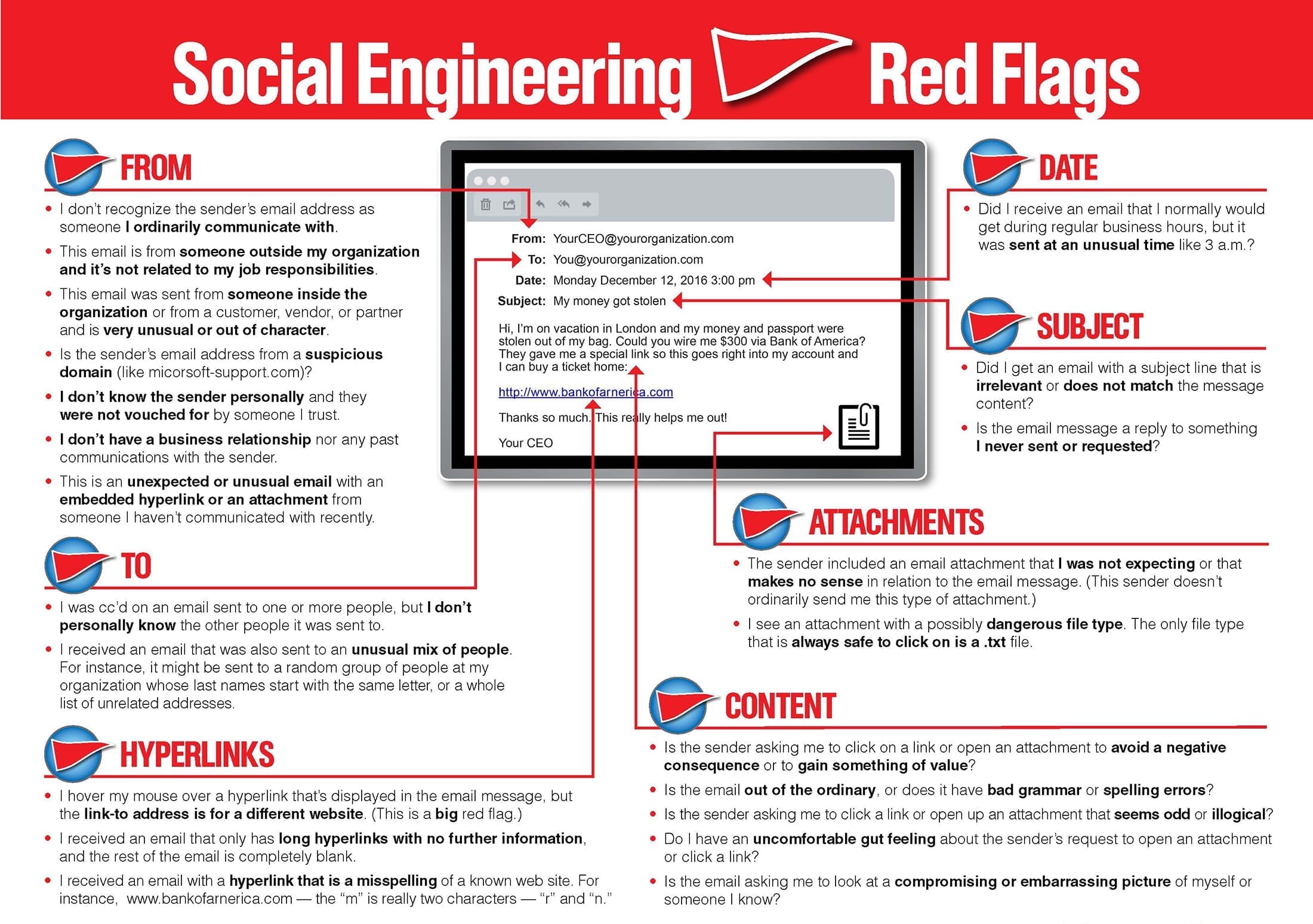
Regardless of whether you are the CEO of a Fortune 500 or a blue-collar worker with hundreds in the bank there is a price on your personal identifiable information (PII). The cost of your information can range from the amount of money you currently have in an account, the amount of credit extended on a card, or the usability of your credentials in escalated attacks. That’s not fear-mongering, it’s a fact. Information is a commodity and either yours and/or the information you hold is worth something. Thankfully, phishing emails can be easily combated with just an increase in situational awareness and following simple rules for emails.

  • This means looking at the sender of emails; including matching the sender name and the sender’s email address.
  • Being wary of all links and attachments. If the attachment is from a stranger or not expected from the sender err on the side of caution and don’t download it without verifying the sender (not through email).
  • Assume links are suspicious. This is just the easiest way to avoid misdirection. If you need to check something out for an account don’t use the email links instead go directly to the site via the browser by typing it in.
References
More Examples of PHishing Emails
Glossary
  1. Phishing – crafted, usually mass-sent emails used to try and garner information from the targets. These are usually not a well crafted, can be automated. Also a broad term that encompasses: spear-phishing and whaling.
  2. Spear-phishing- An email attack which is targeted to certain people, persons, or groups. These emails will be more well crafted and will try to use public available information to craft the message.
  3. Whaling-An even more targeted attack than spear-phishing which casts an even smaller “net” targeting CEOs, COOS, and other upper management accounts.
  4. Social Engineering- Broad term for attacking the “human” element of organizations. This type of attack uses human nature to try and get information or gain access. Phishing falls under social engineering as an attack type.
  5. Situational Awareness- Practicing calm in the moment in order to analyze environmentally what is occurring.
  6. Spoof[ing]- Imitation; pretending or portraying to be an entity in which they are not.
Posted in Learning Woes, Using

Mosse-Institute

or Initial Thoughts on My First Internship, Remotely…

I found out about Mosse Institute from a link on the WiCYS Facebook page. The link touted a “Remote Internship” and I’m always one looking for a way to pad my resume and get more hands on experience so I signed up.

So far the amount of tasks seems massive and it looks like it covers a good bit of subjects. The internship takes accountability for completing these task by having the intern record their solutions.

“Most people miss Opportunity because it is dressed in overalls and looks like work.”

Thomas A. Edison

The downside at least for myself is finding the time and quiet place to do the tasks (The videos are not to contain sound).

I’ve made a commitment to completing at least 1/3 by the end of the year, but I’m really aiming for all.

*Sorry for the lateness of this post, this week has been hectic to say the least…