Posted in Labs, What I've Used

Build A Lab With Me… (#2)

Dualities

The second type of lab I’m currently working on is a dual-boot machine. Some might not advise to building from this type of lab, but it can allow for having a computer that is on a segregated network for analysis and then having that computer also be set with a deep freeze program that resets the computer after logging off cleaning it or having a windows computer that can run Fireye Flare VM again in a double segregated environment.

The idea for this Lab came from interactions with similar set-ups without the dual-booting in which the lab was set-up for analysis on a segregated network. The dual-booting for me was kind of a bonus, because I had wanted to try doing it for a while and then also because it allows me a computer to run Linux away from my main computer while also running Windows. It gives me access to use tools that might be made for either platform in the same computer giving it a singular purpose.

Currently, this lab is not in it’s completed iteration. I still mainly use the VM lab to work on CTFs or do classwork, but this lab is coming 1.0 before the end of summer. So look forward to 2.a, etc in the near future.

PROS:

  • Keeps Lab separate from main computer
  • Allows for practicing from both a Linux and Windows Environment
  • Deep Freeze Software can be used to reset computer after analysis

CONS:

  • Separating would require another system
  • Not as cost effective as VM
  • Dualbooting improperly can damage computer
  • Analysis can damage computer
  • Improperly segregating network might spread malware

(There are any number of sites/videos regarding dualbooting. This is just and example)

My Machine Specs:

Lenovo M72z All-In-One
  • Intel 5-3470S
  • 2.90GHz
  • 8GB DDR3
  • 500GB SATA HDD
  • 20″ Screen
  • Windows 10/Kali
  • DVD-ROM
  • Switch (to segregate the network)

Applications List:

I keep a running list of Applications I want to look at/Test
  • Burp Suite
  • FTK
  • PuTTy
  • OpenVAS
  • TOR
  • IDA
  • Deep Freeze Software
  • Brave Browser
  • Firefox
  • OpenStego
  • Netwitness Investigator
  • Flame VM on VirtualBox
  • SIFT VM on VirtualBox
Posted in CTF, Labs, Learning Woes

Women United over CTF 2.0

Reverse Engineering – First Try

For me this experience was an epic failure, but that’s most definitely because I know absolutely nothing about Reverse Engineering. My frustrations were enhanced by the fact that my entry key was buried in my spam/trash folder and I didn’t think to look in there until an hour before the CTF was scheduled to end. In all honesty this wasn’t my first time signing up for this CTF, but during 1.0 I had to work so only got the bonus membership to Escalate afterwards and never got to touch the platform.

As I stated I know nothing about Reverse Engineering…well, I wouldn’t say nothing. I know the names of some of the tools, namely Ghidra and BinaryNinja, but I’ve never used either. |

I’m trying to leave myself completely open to learning though, which also means participating in as many CTFs as I can schedule. This is a subplot plan that has me trying to get the hands-on experience from anywhere. So, knowing nothing I signed up for this one.

As I state above the problems were mostly caused by me and my email address. I got a little hands-on usage of Binary Ninja to complete simple tasks, but I would have needed way longer than an hour to get anywhere with the medium and hard tasks. I think maybe in the hour I was able to score something like 72 points.

The pro of doing this is that I realized that somethings aren’t that difficult to do when in comes to reverse engineering. I mean this doesn’t make me any sort of expert, nor would I put this on my resume (other than to demonstrate my willingness to learn new tools). I think that it did make me interested in knowing more about reverse engineering. I would like for when 3.0 comes around I score at least 100 points (that was actually my lofty goal this time). The gist is that I’m not going to just stop participating because right now I’m not as knowledgeable.

Some Reverse Engineering Tools

  • Ghidra
  • Binary Ninja
  • IDA Pro
  • Radare2
  • Scylla

Some Reverse Engineering Books

  •  Reverse Engineering For Beginners by Dennis Yurichev
  • The IDA Pro Book by Chris Eagle
  • Hacking the Xbox by Andrew “Bunny” Huang
  • Practical Malware Analysis by Michael Sikorski and Andrew Honig
Posted in What I've Used

What I’ve Used 03/2020

In Support of Flashcards

5/5

This may seem as a departure from the books and services that I have been talking about, but I cannot stress enough using Flashcards as a test prep tool. I know that there are many flashcard applications out there, but I prefer and recommend making ones own flashcards. I think that writing the cards helps through repetition to sear the words into memory.

I contribute making flashcards to a good the score I was able to manage while taking Network+ around this time last year. I did better on that exam than I did on Security+ (though I passed that as well) and I think flashcards made the difference. So, for Linux+ and beyond I’m back on the flashcard train.

I would also recommend the spiral-bound cards or mini-cards as they make flipping easy, though regular cards makes it easier to separate out concepts you: a. know b.kind of know c.don’t know at all.

These repetitive words and phrases are merely methods of convincing the subconscious mind. 

Claude M. Bristol

Posted in Flashback Friday, Learning Woes

Flashback Friday 02/2020

200 Hundred Days of Code

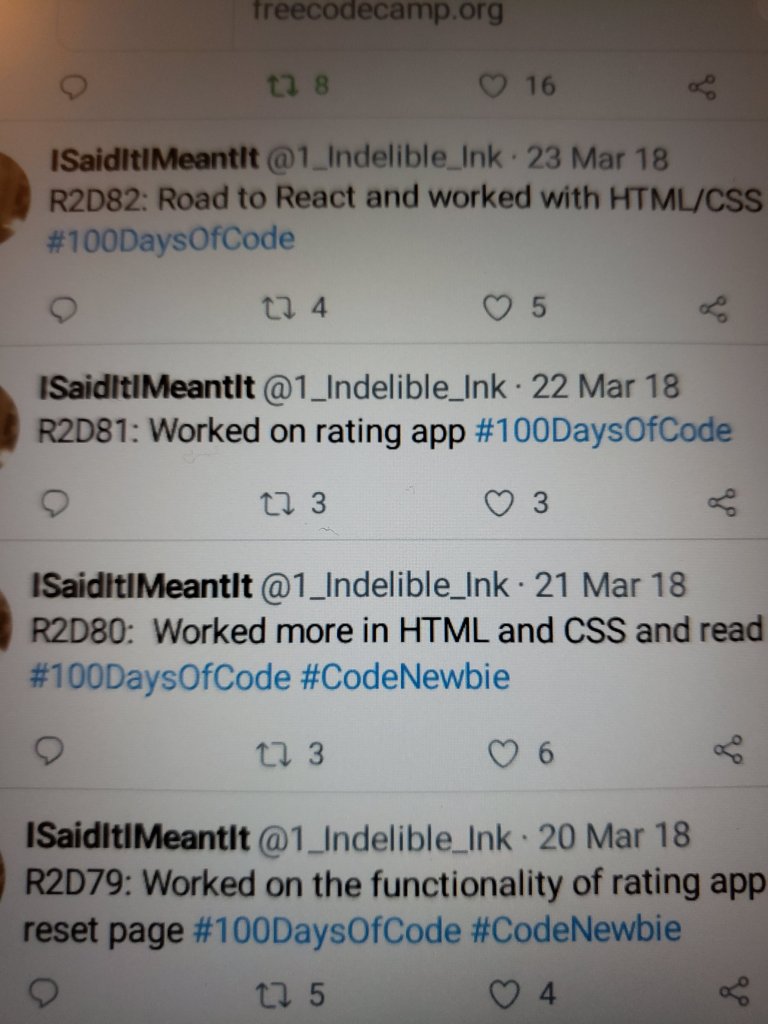
So, we talked about how structure and time are all warped in my head. Flashback to the #100DaysOfCode Challenge.

#100DaysOfCode is a challenge that designing to help people create a habit of coding on a daily basis. The thought is that by committing and posting daily on the things one did to further their coding goals the community works to hold each other accountable for fulfilling this commitment and meeting our personal goals.

I completed the challenge twice. Once, I was just moving towards doing a daily accountability and the second I focused on Javascript. The end result is that I completed the challenges , but it didn’t improve my habits. If nothing else having to complete it because I’d made a commitment kind of burned me out and at some points frustrated me to no end. I think for some it would create a habit and maybe if I had chosen a project to work on that I was passionate about it would have made it fun for me, but I didn’t and didn’t reflect enough about what I wanted and who I am to make a more informed choice before committing. If I was to do the challenge today I would probably concentrated on python for hackers/pentesters and writing scripts, because I think that would keep me interested, but I have a little too much on my plate currently to make that kind of commitment.

Repetition of the same thought or physical action develops into a habit which, repeated frequently enough, becomes an automatic reflex.

Norman Vincent Peale
def greet(name):
    print ('Hello', name)

greet('Jack')
greet('Jill')
greet('Bob')

I would recommend anyone to take up this challenge if they wanted to find a way to build habits. If you look on the site linked below it will show you that #100DaysOf_ can build habits in any number of subjects. I would just interject that if this is the choice to find something that is challenging and interesting enough to make you want to complete the challenge, not because it is a challenge, but because the project makes you passionate.

#100DaysofCode Site

Posted in Learning Woes

Time is the Enemy…

Don’t let Time Management be Your Greatest Foe…

I written about my troubles with time over and over, it’s a reoccurring theme. Time shouldn’t be one’s enemy, but sometimes it does feel like it is. I know that I have a strong procrastination streak and thus far it hasn’t hurt me,but I want to be better with my time, even if it was just to make myself feel a bit more organized.

I also believe that this is a personal concept. Time, can feel like a weight for some and for others making schedules and being on top of their time management can feel cathartic. For me, it’s a tad bit more anxiety-filling. Bullet notebooks and super strict schedules make me itch. I don’t think “habit-tracking” is for me.

Don’t get me wrong, I do work better when I know things are due and I’m responsible, but not when that makes these things micromanage my time and effort. I like knowing there is a date and then finishing whatever, whenever I’m ready by that date. I cannot do the daily scheduled work, it just makes things tedious and increases the pressure I already put on myself.

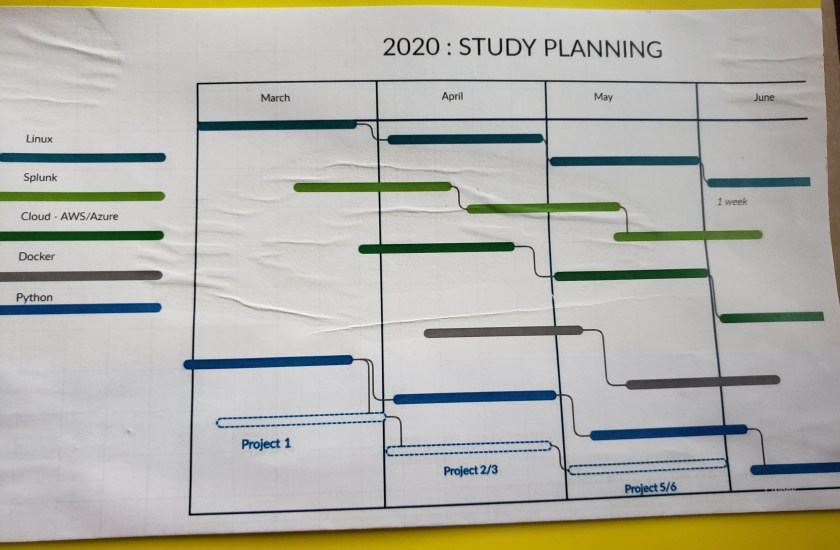
Which is why I came up with a nice little Gantt Chart for the 5 main things that I want to learn for the first halfish of this year. I only included things that I can find a certification for to judge my progress by. I only have the certification exam scheduled for Linux+ though; I bought that last year and have a hard deadline of September to take this exam, though I scheduled to take it Mid-July.


I do sometime wonder if the lack of a coherent tracking system is somehow holding me back from like “my full potential”. Other times I think that this works; the way I work works for me. It will not work for everyone or most, but it works for me. Besides, do I really need one more thing to try to learn and stress over?

Posted in Profiles

Profile in Cyber

“I think it’s very important to get more women into computing. My slogan is: Computing is too important to be left to men.” –

Karen Spärck Jones

Melba Roy Mouton

Was one of NASA’s “human computers” in the early space program. A graduate of Howard University from Virginia, Mouton headed a group of these “human computers” that tracked satellites. Furthermore, Mouton, was also a computer programmer at NASA. Her programs “predicted aircraft locations and trajectories.” (Women & Tech Project, 2014).

More on NaSA’s “Human Computers”:

1929 – June 25, 1990

References:
Posted in Music to Work to, Uncategorized, What I've Used

Music to Work to

Changing gears for a few posts.

There are many scholarly articles written regarding music and productivity. I know when I’m working noise helps me kind of focus and when I’m at work music helps to drown out other things. I actually spend a good deal of time listening to lessons or infographic shows, or historical bits because I’m kind of a nerd, but music aids my productivity. One of the best sounds I’ve found to listen to while working is Lofi Japanese HipHop or TripHop. I like sounds with heavy bass, but not having to think about words helps to just let the music be background.

In this occasional post series I’ll be sharing some of the music that aids in making me a more productive worker and/or helps me to study.

I really got into this type of sound while I was working overseas when I would listen to Arabic HipHop mixes. From there I branched out to this and as I stated above the lack of words makes me zoom into the sound and bop along as I type away.

Posted in Flashback Friday, Learning Woes

Python, I Can’t Quit You….

Hisss, Hisssss, Hisssssss.

I love Python. I admit, that when learning programming Python was not my first language. I started with web development, so I started with JavaScript after getting the hang of HTML5 and CSS3. I don’t hate JS, I just find the syntax structure more taxing in JavaScript. I at first believed that JavaScript was impossible, but really I have trouble with breaking down complex problems more due to wanting to jump right in then in not understanding how to do so–but this is a whole other post and we’re talking about Python!
No matter how far I go in my studies, I keep coming back to wanting to have a grasp on the Python language. I consider myself a Python enthusiast.
I think it’s the similarity to spoken/written language that makes this language appeal the most to me. There are numerous sources that recommend beginners start with Python as a programming language and I support this assertion, unless of course the goal is front-end web development, then of course one might want to do JavaScript.
I want to know enough about both aspects to be considered mildly dangerous and capable of utilizing either when necessary.
So, as I prep out a plan to re-familiarize myself with not only programming, but Python, I realize I really do love this language. I just need to get over the belief that setbacks are permanent. I’m not going to be the best at everything and it all isn’t going to come easy, that was how Programming hit me years ago and I know I got frustrated by feeling like I wasn’t progressing or at least not quickly enough, but hanging out in online programming groups I realized that we’re all googling out way to success, most of us aren’t wunderkind, and imposter syndrome is a daily struggle, but if it interests you, like really interests you probably pretty much going to always find a way back to doing it.

print("Hello, World!")
# Python program to check if  
# given number is prime or not 
  
num = 11
  
# If given number is greater than 1 
if num > 1: 
      
   # Iterate from 2 to n / 2  
   for i in range(2, num//2): 
         
       # If num is divisible by any number between  
       # 2 and n / 2, it is not prime  
       if (num % i) == 0: 
           print(num, "is not a prime number") 
           break
   else: 
       print(num, "is a prime number") 
  
else: 
   print(num, "is not a prime number") 
Posted in What I've Used

What I’ve Used 02/2020

The Basics of Hacking and Penetration Testing – Second Edition
By: Patrick Engebretson [Syngress]

I started this book before finishing the class I took for Cyber Attack and Defense in which in pairs we had to work through penetration testing methodology on a machine chosen from Vulnhub. I just finished it a few days ago, not because it is in any way dense or hard to follow, but because of time management.
Regardless of my shortcomings, this book is exactly as the cover states: The basics.
This book is highly recommended a beginner guide for anyone who is new to hacking or penetration testing. The penetration testing methodology that I spoke of in a recent post is clearly laid out in this book and chapter by chapter Engebretson, walks-through these steps and explains the tools to use and the basic ways in which to use them. There are also chapters that delve into Web Application Hacking and a brief touch on Social Engineering with SET (Social Engineering Toolkit) which were very informative.
I found myself highlighting throughout this book to come back to quickly for my next CTF. It’s a good start into learning these tasks and is excellent in that it sticks with emphasizing a structured approach to penetration testing and hacking. It wouldn’t be good for people who have been doing these tasks for any length of time, but for the intended audience it is definitely worthwhile.

5/5

Cover Image
Posted in Flashback Friday

Flashback Friday 01/2020

#100DaysOfCode Parts I and II

When I was starting out I did two stints of #100DaysOfCode which is as the hashtag reads  a commitment to work 100 consecutive days on coding. I thought that if I did these it would help me buckle down and work on learning to code and for those days it kind of did, but after the stints I remember feeling kind of burnt out.
As I hype myself up right now to go back and work on Python and getting back into working with this language, as well as, prepping to take the Certified Entry-Level Python Programmer certification (PCEP) – [ I really just want to feel kind of validate in my learning, which is the reasoning behind the exam for me] – I find myself thinking back at these stints of daily coding and what might have gone wrong for me.
Although, I am the kind of person who is good with making and sticking with commitments and structured work/learning, I am also the kind of person who is easily annoyed by monotony. The problem for me with #100DaysOfCode is that day after day it can get monotonous and make people such as myself not want to do the work. This is a personal issue and probably an issue with the way in which I went about doing the challenge. I think that instead of focusing on one book for weeks or one project I should have had concurrent projects which I could have rotated when one go stale.
If I decide to do this challenge again this I think that I will have a few projects going and also have FreeCodeCamp rework / Github Clean up interwoven. I’m still on the fence with whether or not I should do something like this challenge, but some parts of it were very good for me, it made me productive in a way.

“The critical ingredient is getting off your butt and doing something. It’s as simple as that. A lot of people have ideas, but there are few who decide to do something about them now. Not tomorrow. Not next week. But today.”

~ Nolan Bushnel