
Posted in Uncategorized

Flashback Friday 03/2020

CodeLand – My First Tech Conference

May 2018

I attended Codeland in May 2018in New York City, New York. This was my first time at a tech conference and I think it was the first or second time they held the conference. It was also my first time in New York City.

Codeland was in a word awesome, because it was approachable. It is put on by Code Newbies and the majority of attendees are newer to coding/programming.

I enjoyed the conference because it didn’t feel like I needed to put on my “professional” face. I could just enjoy being there and listening to the talks and seeing all of the truly awesome ways that people were learning to code and using code in theory projects

If I could have changed 1 thing about the experience it would have been to get to know people there more, but I’m socially awkward on the best day. I also didn’t bring my laptop and that was a mistake.

This year they’re doing it distributed online and I really cannot wait to see how it goes.

Google: Codeland (Distributed) for more details….
Posted in Informational, Topic

Phishing

Spam, Scams, and Being Targeted…

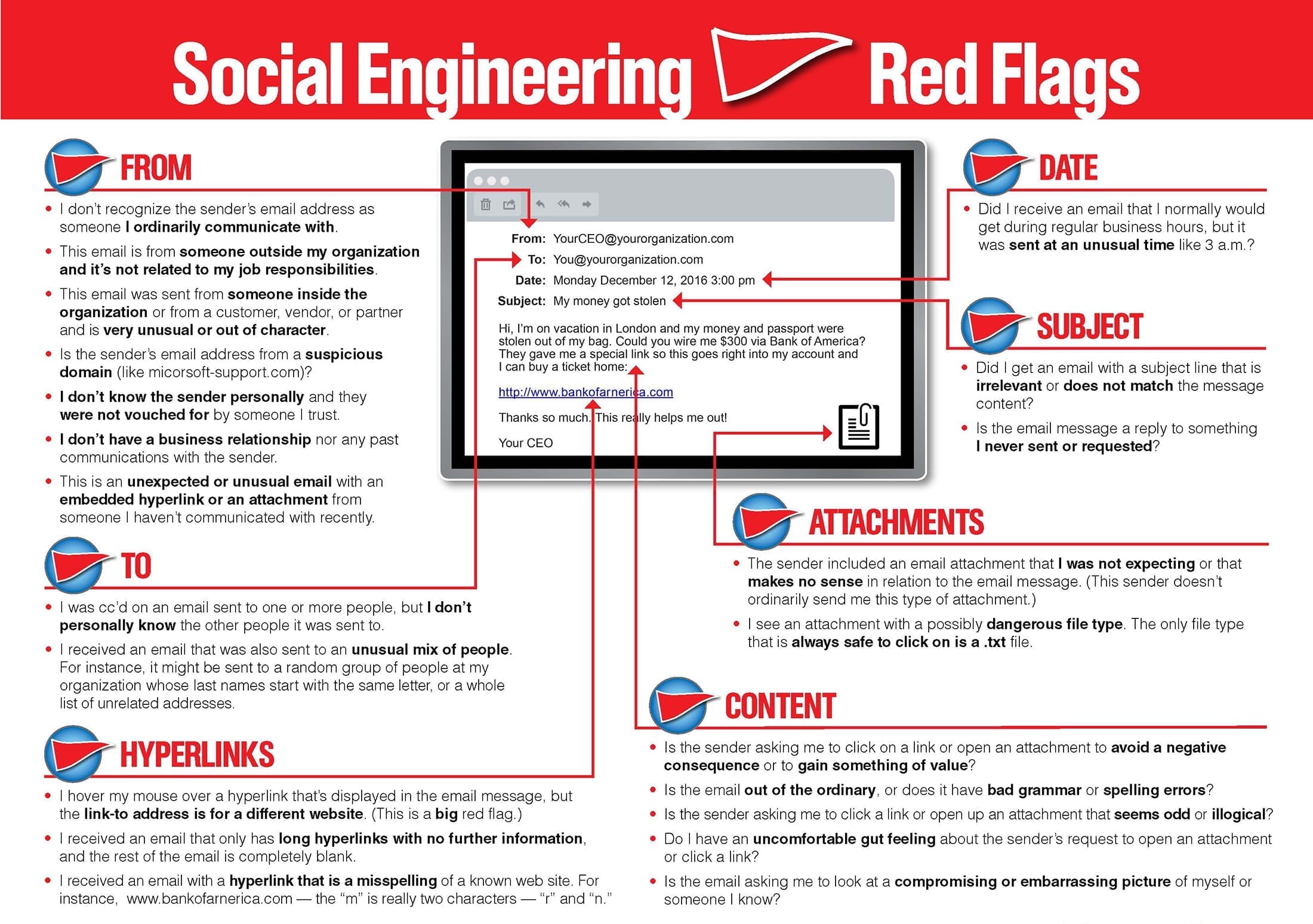
Regardless of whether you are the CEO of a Fortune 500 or a blue-collar worker with hundreds in the bank there is a price on your personal identifiable information (PII). The cost of your information can range from the amount of money you currently have in an account, the amount of credit extended on a card, or the usability of your credentials in escalated attacks. That’s not fear-mongering, it’s a fact. Information is a commodity and either yours and/or the information you hold is worth something. Thankfully, phishing emails can be easily combated with just an increase in situational awareness and following simple rules for emails.

  • This means looking at the sender of emails; including matching the sender name and the sender’s email address.
  • Being wary of all links and attachments. If the attachment is from a stranger or not expected from the sender err on the side of caution and don’t download it without verifying the sender (not through email).
  • Assume links are suspicious. This is just the easiest way to avoid misdirection. If you need to check something out for an account don’t use the email links instead go directly to the site via the browser by typing it in.
References
More Examples of PHishing Emails
Glossary
  1. Phishing – crafted, usually mass-sent emails used to try and garner information from the targets. These are usually not a well crafted, can be automated. Also a broad term that encompasses: spear-phishing and whaling.
  2. Spear-phishing- An email attack which is targeted to certain people, persons, or groups. These emails will be more well crafted and will try to use public available information to craft the message.
  3. Whaling-An even more targeted attack than spear-phishing which casts an even smaller “net” targeting CEOs, COOS, and other upper management accounts.
  4. Social Engineering- Broad term for attacking the “human” element of organizations. This type of attack uses human nature to try and get information or gain access. Phishing falls under social engineering as an attack type.
  5. Situational Awareness- Practicing calm in the moment in order to analyze environmentally what is occurring.
  6. Spoof[ing]- Imitation; pretending or portraying to be an entity in which they are not.
Posted in Learning Woes, Using

Mosse-Institute

or Initial Thoughts on My First Internship, Remotely…

I found out about Mosse Institute from a link on the WiCYS Facebook page. The link touted a “Remote Internship” and I’m always one looking for a way to pad my resume and get more hands on experience so I signed up.

So far the amount of tasks seems massive and it looks like it covers a good bit of subjects. The internship takes accountability for completing these task by having the intern record their solutions.

“Most people miss Opportunity because it is dressed in overalls and looks like work.”

Thomas A. Edison

The downside at least for myself is finding the time and quiet place to do the tasks (The videos are not to contain sound).

I’ve made a commitment to completing at least 1/3 by the end of the year, but I’m really aiming for all.

*Sorry for the lateness of this post, this week has been hectic to say the least…

Posted in Labs, What I've Used

Build A Lab With Me… (#2)

Dualities

The second type of lab I’m currently working on is a dual-boot machine. Some might not advise to building from this type of lab, but it can allow for having a computer that is on a segregated network for analysis and then having that computer also be set with a deep freeze program that resets the computer after logging off cleaning it or having a windows computer that can run Fireye Flare VM again in a double segregated environment.

The idea for this Lab came from interactions with similar set-ups without the dual-booting in which the lab was set-up for analysis on a segregated network. The dual-booting for me was kind of a bonus, because I had wanted to try doing it for a while and then also because it allows me a computer to run Linux away from my main computer while also running Windows. It gives me access to use tools that might be made for either platform in the same computer giving it a singular purpose.

Currently, this lab is not in it’s completed iteration. I still mainly use the VM lab to work on CTFs or do classwork, but this lab is coming 1.0 before the end of summer. So look forward to 2.a, etc in the near future.

PROS:

  • Keeps Lab separate from main computer
  • Allows for practicing from both a Linux and Windows Environment
  • Deep Freeze Software can be used to reset computer after analysis

CONS:

  • Separating would require another system
  • Not as cost effective as VM
  • Dualbooting improperly can damage computer
  • Analysis can damage computer
  • Improperly segregating network might spread malware

(There are any number of sites/videos regarding dualbooting. This is just and example)

My Machine Specs:

Lenovo M72z All-In-One
  • Intel 5-3470S
  • 2.90GHz
  • 8GB DDR3
  • 500GB SATA HDD
  • 20″ Screen
  • Windows 10/Kali
  • DVD-ROM
  • Switch (to segregate the network)

Applications List:

I keep a running list of Applications I want to look at/Test
  • Burp Suite
  • FTK
  • PuTTy
  • OpenVAS
  • TOR
  • IDA
  • Deep Freeze Software
  • Brave Browser
  • Firefox
  • OpenStego
  • Netwitness Investigator
  • Flame VM on VirtualBox
  • SIFT VM on VirtualBox
Posted in CTF, Labs, Learning Woes

Women United over CTF 2.0

Reverse Engineering – First Try

For me this experience was an epic failure, but that’s most definitely because I know absolutely nothing about Reverse Engineering. My frustrations were enhanced by the fact that my entry key was buried in my spam/trash folder and I didn’t think to look in there until an hour before the CTF was scheduled to end. In all honesty this wasn’t my first time signing up for this CTF, but during 1.0 I had to work so only got the bonus membership to Escalate afterwards and never got to touch the platform.

As I stated I know nothing about Reverse Engineering…well, I wouldn’t say nothing. I know the names of some of the tools, namely Ghidra and BinaryNinja, but I’ve never used either. |

I’m trying to leave myself completely open to learning though, which also means participating in as many CTFs as I can schedule. This is a subplot plan that has me trying to get the hands-on experience from anywhere. So, knowing nothing I signed up for this one.

As I state above the problems were mostly caused by me and my email address. I got a little hands-on usage of Binary Ninja to complete simple tasks, but I would have needed way longer than an hour to get anywhere with the medium and hard tasks. I think maybe in the hour I was able to score something like 72 points.

The pro of doing this is that I realized that somethings aren’t that difficult to do when in comes to reverse engineering. I mean this doesn’t make me any sort of expert, nor would I put this on my resume (other than to demonstrate my willingness to learn new tools). I think that it did make me interested in knowing more about reverse engineering. I would like for when 3.0 comes around I score at least 100 points (that was actually my lofty goal this time). The gist is that I’m not going to just stop participating because right now I’m not as knowledgeable.

Some Reverse Engineering Tools

  • Ghidra
  • Binary Ninja
  • IDA Pro
  • Radare2
  • Scylla

Some Reverse Engineering Books

  •  Reverse Engineering For Beginners by Dennis Yurichev
  • The IDA Pro Book by Chris Eagle
  • Hacking the Xbox by Andrew “Bunny” Huang
  • Practical Malware Analysis by Michael Sikorski and Andrew Honig
Posted in What I've Used

What I’ve Used 03/2020

In Support of Flashcards

5/5

This may seem as a departure from the books and services that I have been talking about, but I cannot stress enough using Flashcards as a test prep tool. I know that there are many flashcard applications out there, but I prefer and recommend making ones own flashcards. I think that writing the cards helps through repetition to sear the words into memory.

I contribute making flashcards to a good the score I was able to manage while taking Network+ around this time last year. I did better on that exam than I did on Security+ (though I passed that as well) and I think flashcards made the difference. So, for Linux+ and beyond I’m back on the flashcard train.

I would also recommend the spiral-bound cards or mini-cards as they make flipping easy, though regular cards makes it easier to separate out concepts you: a. know b.kind of know c.don’t know at all.

These repetitive words and phrases are merely methods of convincing the subconscious mind. 

Claude M. Bristol