When I was starting out I did two stints of #100DaysOfCode which is as the hashtag reads a commitment to work 100 consecutive days on coding. I thought that if I did these it would help me buckle down and work on learning to code and for those days it kind of did, but after the stints I remember feeling kind of burnt out. As I hype myself up right now to go back and work on Python and getting back into working with this language, as well as, prepping to take the Certified Entry-Level Python Programmer certification (PCEP) – [ I really just want to feel kind of validate in my learning, which is the reasoning behind the exam for me] – I find myself thinking back at these stints of daily coding and what might have gone wrong for me. Although, I am the kind of person who is good with making and sticking with commitments and structured work/learning, I am also the kind of person who is easily annoyed by monotony. The problem for me with #100DaysOfCode is that day after day it can get monotonous and make people such as myself not want to do the work. This is a personal issue and probably an issue with the way in which I went about doing the challenge. I think that instead of focusing on one book for weeks or one project I should have had concurrent projects which I could have rotated when one go stale. If I decide to do this challenge again this I think that I will have a few projects going and also have FreeCodeCamp rework / Github Clean up interwoven. I’m still on the fence with whether or not I should do something like this challenge, but some parts of it were very good for me, it made me productive in a way.
“The critical ingredient is getting off your butt and doing something. It’s as simple as that. A lot of people have ideas, but there are few who decide to do something about them now. Not tomorrow. Not next week. But today.”
I know that there is no point in which in this field you will have learned everything. There is no end point in Information Technology, Cybersecurity, Programming. There are constant innovations and learning is pretty much lifelong. That being said sometimes it can be a little overwhelming when you think about all of the things that interest you. I know that there are numerous things that I want to get some hands on experience with and sometimes I get anxiety about not doing enough towards learning these things. This is probably one of the reasons that I have a plethora books on all the subjects that interest me so that I can get to them when I have the time. I think maybe the most important two things is to keep track of the items that interest you and also not stress the timeline so much, try to make a general goal/outline of steps to take in order to accomplish learning the things that interest you.
“Absorb what is useful, reject what is useless, add what is specifically your own.”
Hack Metasploitable 2 and Hackfest 2019 from VulnHub
So, before I set the tone that I just am not a “group work” type of person let me just say that this past Fall 2 semesters (2019) I had the best group experience. It does happen, if all member care equally as much about the grade and are just as interested in the topic.
We were tasked with choosing a Virtual Machine on VulnHub and using the Penetration Testing Methodology to work through finding and exploiting a vulnerability in order to gain access to the machine. We were doing this in conjunction with classwork wherein we worked through doing the same using Metasploitable 2 as the target machine.
So, let’s work quickly and briefly through this, because like some other beginners it helps to know that there is a method to the madness and following said method aids in keep any penetration test on track. If you don’t you’ll be like me during the NCL CTF bashing your head against problems as if that’s the way to solve them.
Penetration Testing Methodology
Planning
For this step the parameters of the assignment were given to us. Work through the methodology steps in order to gain access to the given machines.
Reconnaissance
This step was accomplished through various Nmap scans. This is easier for Metasploitable 2 than it is for HackFest 2019 because with Metasploitable one can login to the machine and then run ifconfig to get the machine’s IP address. With the HackFest Machine you cannot login because credentials are not given to you. There are 2 ways that I know to solve this problem: easy and cheat.
The easy way is to use your source machine (hopefully Kali or Parrot) and run an Nmap scan against the broadcast IP of the network [this only works if both machines are on the same network, this is certainly more difficult in the wild, but easy in a VM Lab Set-up on their own network]. You can get the broadcast IP by running ifconfig on the source machine and noting the broadcast IP in the first line.
nmap XXX.XXX.XXX.0/#
Nmap example to scan an entire subnet to find the target’s IP address
The Cheat is by bringing up the machine’s information in the Virtual Machine Application both VirtualBox and VMWare will tell you the IP address assigned to the machines.
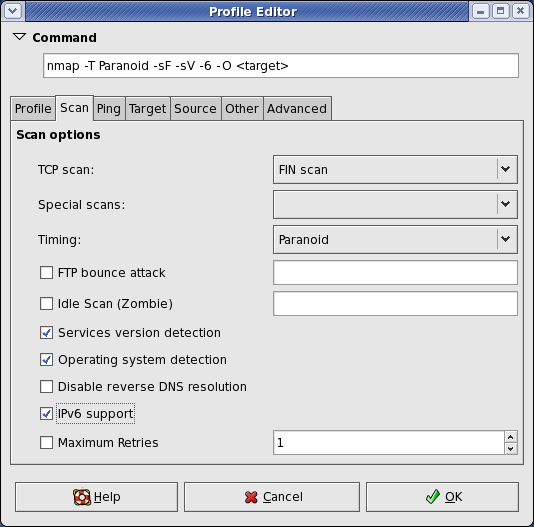
Once you have the IP address for the target machine then use either Nmap or Zenmap to scan the target. It might take a couple of scans to get both UDP and TCP open ports and all the running services. I’ll show the scan commands, but we used Zenmap which craft the commands based on the scan that is chosen and then the scans can be saved using a dropdown menu.
Useful Nmap Scans at this point (note that these can be combined into fewer scans):
nmap -sT IP_Address (TCP connect Scan)
nmap -sU IP_Address (UDP ports)
nmap -A -sV IP_Address (Standard OS and Service Detection)
nmap -p- IP_Address (Scan ALL Ports)
Vulnerability Analysis
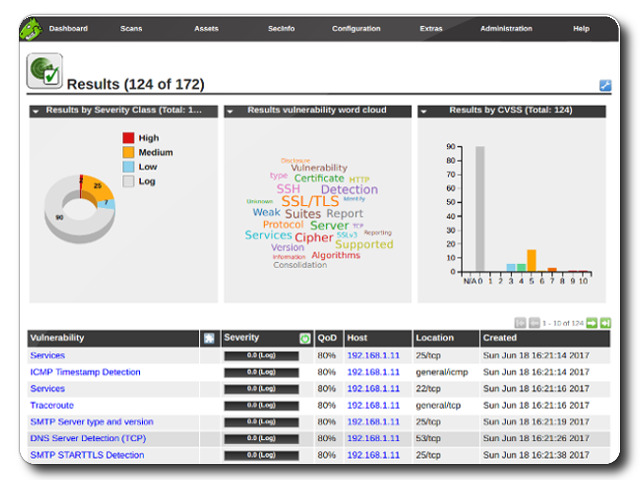
When we finished with the scan we’re left with a good bit of information, a whole list of ports that appear to be open. There’s also some information on the Services running on these ports and the Operating System running on our machine. Depending on what’s running and the command used we can also get some additional information regarding scripts or insecure passwords or encryption being used. With this port information we have a narrower view of what or where or vulnerabilities might lay. These initial scans give us a little bit more direction. I think of it as being in a long hall lined on both walls with a bunch of doors. The Nmap scan would be making all the ones that cannot open disappear. The OpenVAS vulnerability scan in a way tells you which are the easiest to open. I won’t go through setting up OpenVAS because there are better guides than mine that walk-through doing this. We used the web interface to run our scans, sometimes it seems a bit clunky and can be slow, but for beginners it’s pretty simple to navigate. Set the IP of the target machine as the target and run the scan. Ours took anywhere from 30 mins -1 hour to run our scans. After the scans are run we get a good bit of information including a CVSS Base Score (0-10.0: None/Low-Critical) for the Machine and a list of vulnerabilities on the machine. Each vulnerability is scored, some have remediation steps if there are any, and most tell the user how the vulnerability might be exploited.
Exploitation
Now we know which doors can possibly unlocked, we just have to find the door that leads to where we need to go (usually privilege escalation) and not the ones that lead to the broom closet. Although it is worth it to use the Metasploit Framework to work through exploitation on the Command Line again we’re new and in this class we used Armitage. I’ve done work in a previous class using Metasploit; Armitage is definitely easier. Armitage can take in your saved information from Nmap and OpenVAS and check for exploits and it can run automatic exploits to see if any work. Again, I’m not going to walk through setting up Armitage because this has been well traveled on the internet: here or here.
I will say that my partner also used WPScan because HackFest 2019 has a WordPress vulnerability. I didn’t so I’m not going to walk through that, but I’ll point you in the right direction for it.
Metasploitable 2 does not have a Word Press vulnerability. I won’t tell you where or which vulnerable connection, but there is a certain exploit that leads to a connection in which it is simple to escalate privilege to root and steal the shadow directory.
Promise, if I can do this, you can!
Post-Exploitation
One of the main activities at this point is to conduct some password cracking. We have the shadow directory information which should contain some usernames and hashes. Copy these into a text file and with Johnny (the GUI for John the Ripper) feed them in.
Reporting
Reporting might be a difficult part for some, but this really was the part to me where I shine. There are numerous examples of reports that can be found online. Also, how you write your report as far as content could depend on a number of factors including:
The context of the testing (parameters and the like)
The number of machines being tested
The requests of the “client”
The different methodology formats that one might follow; such as if following an outline by certain committees or “certifying” bodies.
It’s important that the report be detailed, but approachable. It also needs to include recommendations for remediation as well as all proof that the vulnerabilities and the exploits exists. For class we had screenshots, but it it was a professional report this might not work as well in the middle of the paper, but rather in an appendix or exhibit at the end.
It is recommended by most professionals that one learn to do these things on the command line and not focus on the GUI, but I find that it is valuable to be able to do both. I am more comfortable with the GUI though.
So, this will probably be a short post. I have just started the last class for the bachelor’s part of my dual degree (I know that some will say that going to school for cybersecurity is unnecessary, but I thrive in classroom settings or with direction). I’m antsy about finishing this part of the program. Honestly I’m a slight bit overwhelmed by the work as well. We’re suppose to finish a professional resume, a portfolio, a group project (group projects are the worst and online groups projects are like the 3rd level or hell), and an exam with a java programming portion. Sure, there are 15 weeks to complete all of that so it’s doable, but it’s still a bit nerve wrecking. I’m so afraid of failure it’s not funny. But, it’s better for me to admit that I’m scared than to act like I’m not scared. I just need to keep telling myself that I can do this and take it all week by week.
(Late because I took CYSA + Beta on Thursday 1/09) [Fingers-Crossed]
I think people direct people to “find what they love and do it…” They say that as if doing that is just the easiest thing, but sometimes it isn’t. For example the number of things I thought I really wanted to do and then finally realized I wasn’t suited for or I really wasn’t as interested in are too numerous to list here. I will admit that it is important to find the things that you are most interested in because it makes you want to learn more about it. Although, there is often things that one has to learn in order to move forward or change careers or what have you, it’s also important to kind of focus in one the things that really interest you and learn about them.
Peerlyst
For me, Digital Forensics and Penetration Testing is one of the subsets of Cybersecurity that really interests me. I may have to learn to do SIEM investigations and log analysis for work, but learning these things isn’t a passion project for me, it’s a means to an ends. These things are still interesting , but when I learn them it’s not the same sense of pride or what have you as I feel when I uncover something or even when doing a CTF.
CompTIA
I 100% am not set on what exactly what I will be doing in 5 or 10 years. Because my path has diverged so often and in such varied ways I try not to make solid plans, but rather have an outline of things I would like to learn or do. Whether that would work for others isn’t for me to say. I just know that I tried to rigid planning thing and that didn’t work for me at all. The unplanned plan does work.
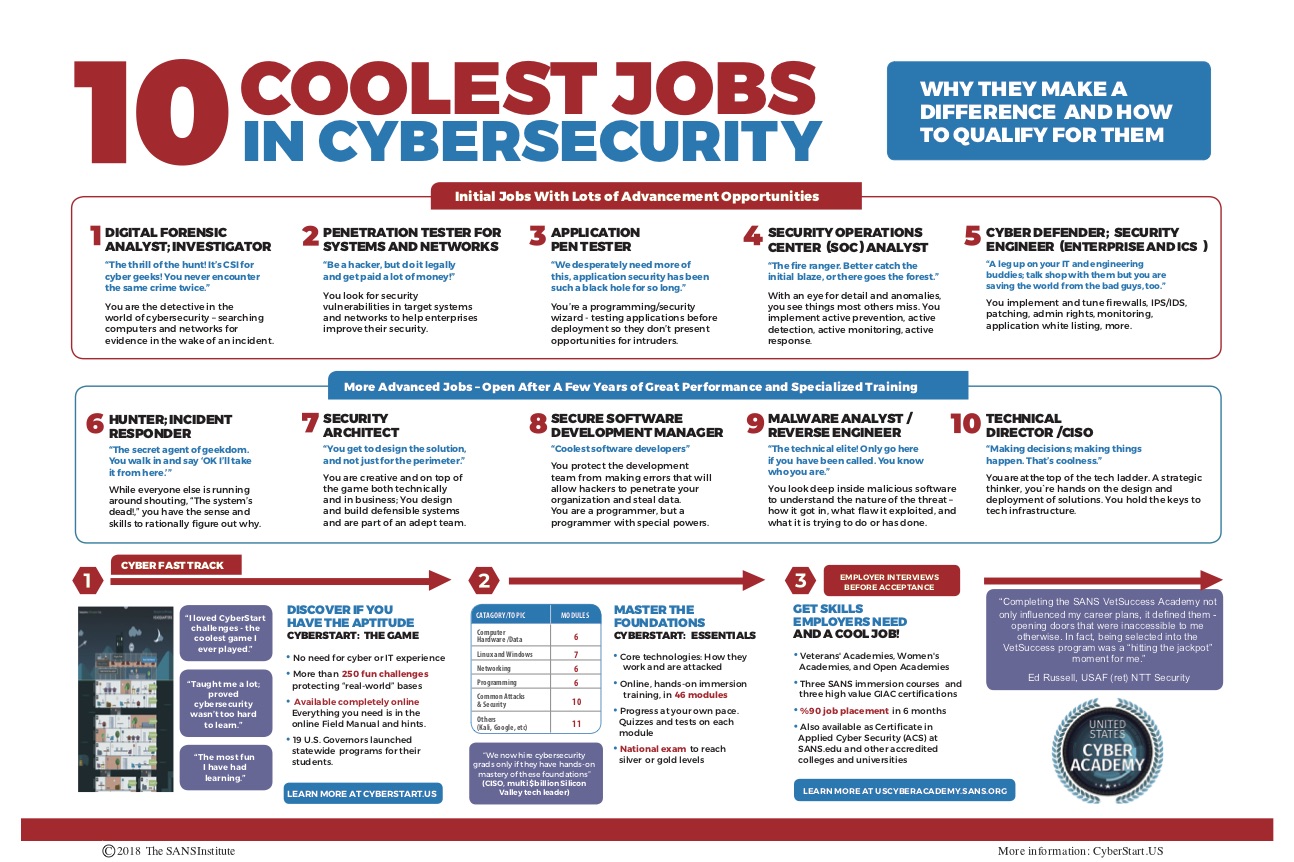
SANS
My best advice would be to learn, to be open to learning and always be researching shifts and changes and developments and then just to absorb the things that interest you the most and see where these things might take you.
Cybrary.it is one of the first sites that I really got into using when I started dipping my toes into learning cybersecurity/infosec/info tech. This was before they started with the Cybrary Pro tier, so I started when all they had was free, but now I am a Pro/Insider member.
The free tier offers access to numerous videos, guides, and the Open Blog which is nice to read up on what others are trying and learning. This tier though is limited in scope and sometimes the information is slow to be updated.
The Pro/Insider tier offers all that the free tier offers, as well as: career learning paths, labs, practice tests, first access to on-demand videos, mentors, access to the slack channels, etc. The cost is worth it especially if the company will cover it, but if you do most of your learning out of your own pockets (like myself) then try to catch it on sale (Like it currently is).
I’m currently following the SOC analyst pathway with a lot of side classes that I keep adding to my queue as my interests are piqued. I also use the platform to do pre-tests for my certifications to focus my studying/practice so I can concentrate on the items in which I’m weak.
I think that this site is a valuable tool for anyone that is learning in these fields, especially if they “self-taught” or need supplemental resources. I wouldn’t necessarily say that the Insider level is required, but it is in my opinion it has thus far held value in my studies and catching a sale or discounted price has not be especially hard.
The main issues I have with the site are that some of the videos have sound quality issues. The CYSA+ course suffers from the classroom style environment in my honest opinion it was probably my least favorite video set that I’ve taken from Cybrary. I still would recommend the site as a good source just from the amount of content that is available.




 Build A Security Ninja